Review newly published Library pages
Use an event Trail to prepare a source-based review without changing the page.
A Library review can help your team notice missing context in new resources. This recipe asks a Robot to read each newly published page and return a short review. It leaves the page as it is; the review lives in the Trail's history.
Before you begin
Complete Robot setup.
You need the following permissions: Manage robots, Use robots, Read published library pages, and Manage Trails. For the test, you also need permission to create and publish a Library page.
The trigger will be Node published, which fires when a Library page is published. This gives the author time to write the page before the review runs. Node created may fire earlier, while it is still an empty draft.
Create the reviewer
Open Robots → New Robot and enter:
- Name:
Library reviewer - Description:
Read a published Library page and suggest missing context. - Model: use the configured default.
- Toolsets: Document exploration.
- Individual tools: Get Library Page and Open Library Page.
Use this Playbook:
Review the Library page identified in the request. Get its metadata, open it,
and read its content. Use document tools to inspect any relevant sections
beyond the initial preview. Return its title, a one-sentence summary, and up to
three specific suggestions for missing context. If it is already clear and
useful, say so. Do not invent requirements or judge from the title alone.
Do not edit, publish, hide or delete content. If the page cannot be read,
report that limitation instead of guessing.
Choose Create, then Test Robot. Ask it to review an existing published page, including that page's URL. Check that its suggestions relate to the actual content and that it makes no changes.
Connect the event
Create a Trail named Review published Library pages. Under Trigger, choose Event and select Node published. Choose Library reviewer for the Robot action and use this instruction:
Review the Library page identified by the triggering event. Use the event's
page ID or slug to read the page. Return a plain-text review with the title,
a short summary and any specific missing context. Do not change the page.
If the payload does not identify a readable page, report that you are blocked
and explain what is missing.
Choose Create Trail. It becomes active immediately.
Test with a page
Create a draft Library page called Photo walk checklist with this content:
Bring a camera, a charged battery and a spare memory card. Comfortable shoes
and a waterproof layer are useful. We will share our photographs afterwards.
Publish it once the text is saved, then open the Trail. Find the event run in Run history and choose View Robot session to inspect the page it read. The review should identify Photo walk checklist, summarise the actual advice and, if useful, suggest specific missing context. The page itself should be unchanged.
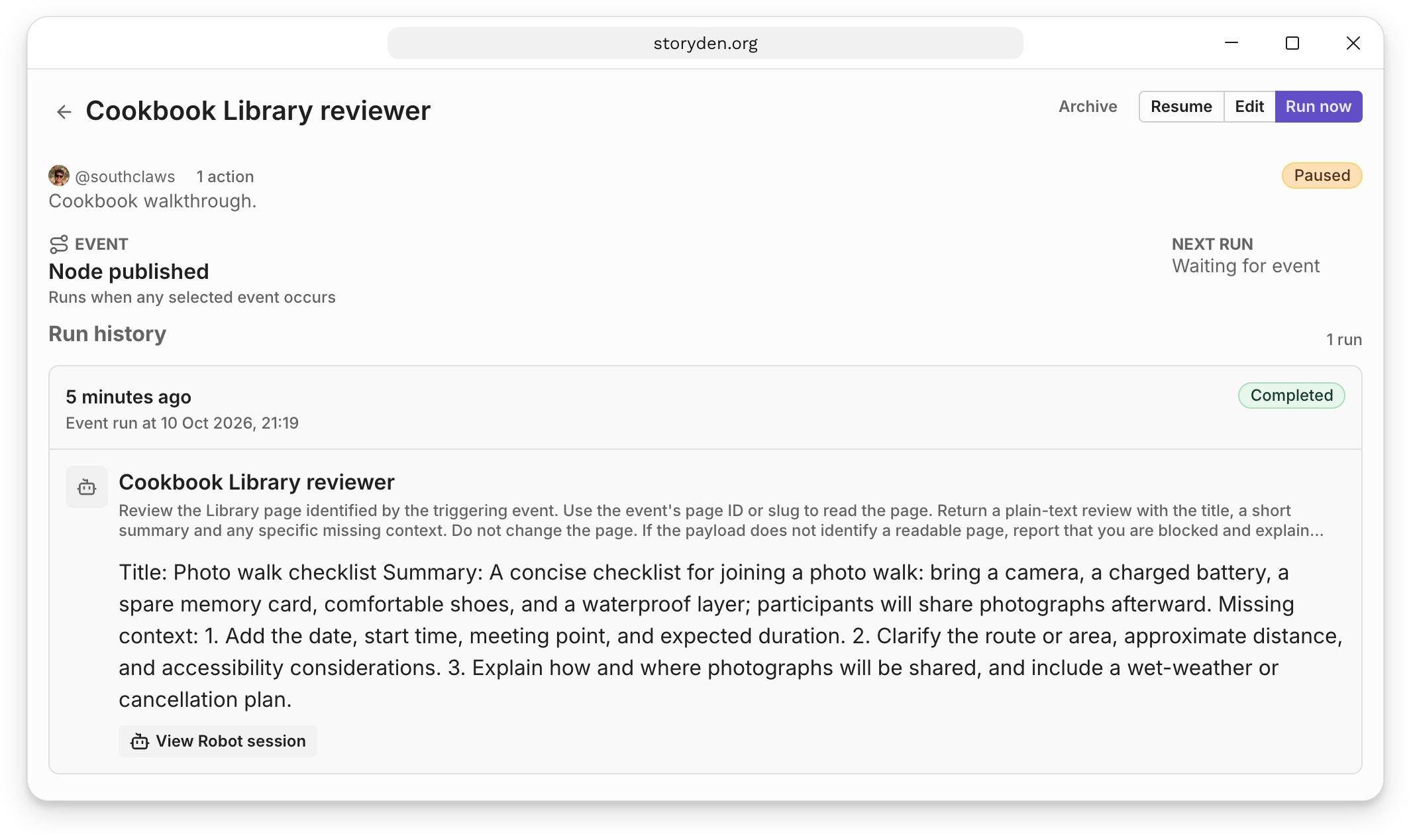
Run now is not a substitute for this test: a manual run does not contain the page event payload. If no event run appears, check that the Trail was active when the page was published and that Node published is selected. For a blocked run, inspect the result and the creator's permissions.
Keep or pause the review
Leave the Trail active to review future published pages, or pause it after testing. It does not review pages published before it was active. You can review an older page directly through Test Robot using its URL.
A review is advice for your team, not an approval or rejection. Act on useful suggestions through the ordinary Library editor. Because this Robot has only reading tools, it cannot edit a page in response to its own review.