A weekly Library reading list
Combine a focused Robot and a Monday morning Trail to prepare reading for your team.
This recipe prepares a short reading list from your community's Library and keeps it in a Trail's run history. It uses built-in tools and does not publish a thread or edit the pages it reads.
Before you begin
Complete Robot setup, including a provider, default model and access for trusted staff.
You need the following permissions: Manage robots to create the Robot, Use robots to test it, Read published library pages to read its content, and Manage Trails to schedule it.
Have at least three published Library pages with useful content.
Create the librarian
Open Robots → New Robot and enter:
- Name:
Community librarian - Description:
Find useful reading in our shared Library. - Model: leave unset to use the configured default.
- Toolsets: Document exploration.
- Individual tools: List Library Pages, Get Library Page, and Open Library Page.
Use this Playbook:
Find useful reading in the community Library. List published pages, following next_page if you need more candidates, then open and read the relevant pages. Use document tools when more of a page needs to be inspected. Base descriptions on what you actually read, not just titles. If a page cannot be read, explain the limitation. Do not change any content.Choose Create, then Test Robot. Send:
Find up to three useful Library pages about design or making things.
Read them and return each page title with one sentence about what it offers.
If fewer than three suitable pages exist, include only those you can verify.
Replace “design or making things” with a topic your Library covers. Open the sources and check that the descriptions match them. The browsing and document tools let this work without relying on semantic search being configured.
Schedule the reading list
Open Robots → Trails → New Trail and name it Weekly Library reading. Select Schedule, set the cadence to Selected weekdays, select Monday, and choose a future starting date and 09:00 in your community's timezone. Choose Preview next five to check the dates.
Under Robot actions, select Community librarian and paste the request above as the instruction. Add this sentence:
Return the reading list as plain text in the run result. Do not publish a
thread or change any page. If no suitable pages are available, say so.
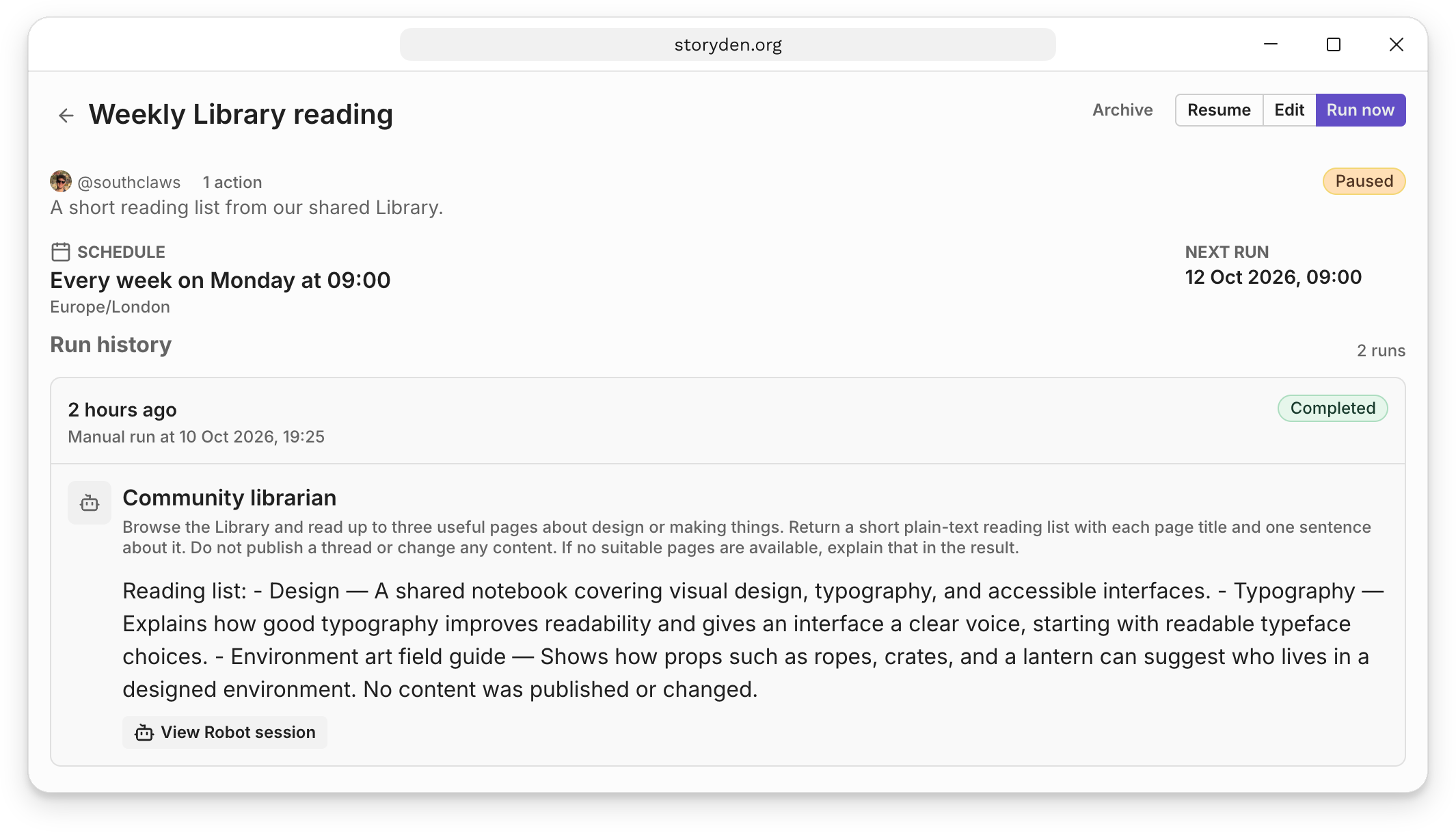
Choose Create Trail, then Pause and Run now to test it. Read the result under Run history and use View Robot session to inspect the pages it opened.
Use the result
A successful test contains up to three real page titles with descriptions supported by their content. Fewer results, or a clear explanation that nothing suitable was found, is preferable to invented reading.
Choose Resume to leave the weekly schedule active. The result stays in Storyden for your team to review and share manually. This instruction selects useful reading each time; it does not keep a record of previously featured pages, so repeats are possible.
If this was only a trial, leave the Trail paused. To change its topic later, edit the Trail's instruction; the librarian's general playbook can stay the same.