Schedules
Choose a cadence, preview upcoming runs and understand calendar behaviour.
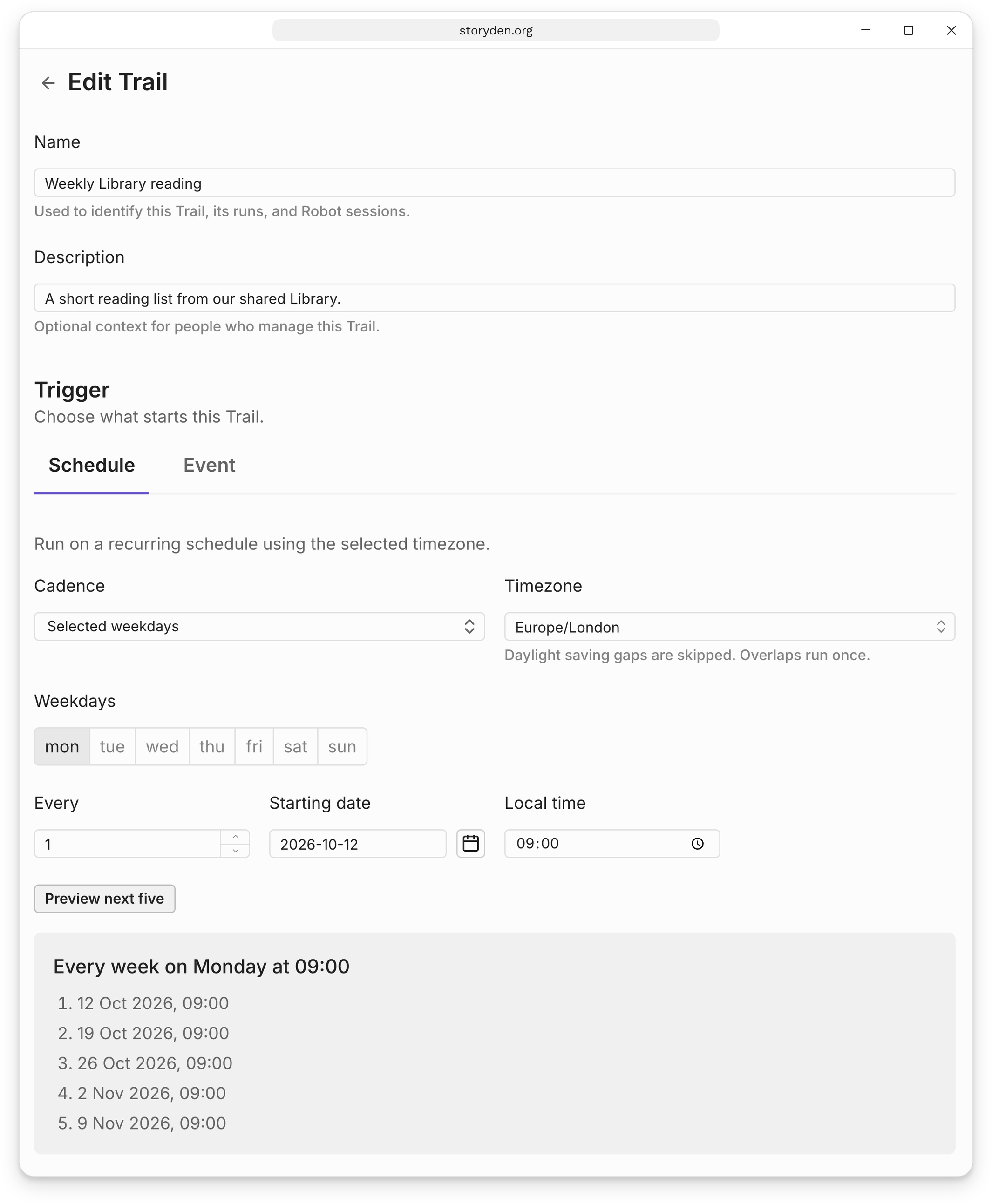
After creating your first Trail, use Edit → Trigger → Schedule to change when it runs.
Cadence
| Cadence | Example |
|---|---|
| One time | Review a set of submissions on a particular date. |
| Every few hours or days | Check for material needing attention every six hours. |
| Selected weekdays | Prepare a reading list every Monday, or every other Tuesday and Thursday. |
| Monthly | Review a directory on a selected day or the last day of each month. |
| Yearly | Prepare material for an annual community event. |
Calendar dates that do not exist are skipped. A monthly schedule for the 31st does not run in February; choose the last day of the month if that is what you mean.
Timezones and previews
Choose the timezone whose local clock the schedule should follow. A weekly 09:00 schedule remains at 09:00 there when daylight saving time changes. Nonexistent local times during a clock change are skipped; repeated local times run once.
Use Preview next five after changing the cadence, timezone, starting date or time. The preview shows the upcoming occurrences before you save.
Pauses and downtime
Pausing stops new automatic runs. Run now starts a separate manual run without shifting the schedule. When the scheduler returns after downtime, missed scheduled work is recorded as skipped instead of running a backlog. See Runs and results for how this appears in history.