Your first Trail
Set up a Robot, choose a trigger and test your first unattended task.
On a fresh installation, set up Robots first: enable a model provider, choose a default model, and assign access to trusted staff. Trails do not configure a provider for you.
Before you begin
To create and run the Trail, you need the following permissions: Manage Trails, Use robots, and any permissions required by its tools. Create a specialist Robot and use Test Robot to try the task in a chat. A Library reading task also needs some published Library pages to work with.
The weekly reading list recipe supplies the exact tools and playbook if you want a complete example.
Choose a schedule
Choose New Trail and give it a name and description. The name should make the recurring job recognisable in the list and its run history: Weekly Library reading, for example.
Under Trigger, select Schedule. For a Monday morning reading list:
- Set Cadence to Selected weekdays.
- Choose the timezone the schedule should follow, such as Europe/London.
- Select Monday, repeat every 1 week, and choose a starting date and local time.
- Choose Preview next five to check the upcoming occurrences.
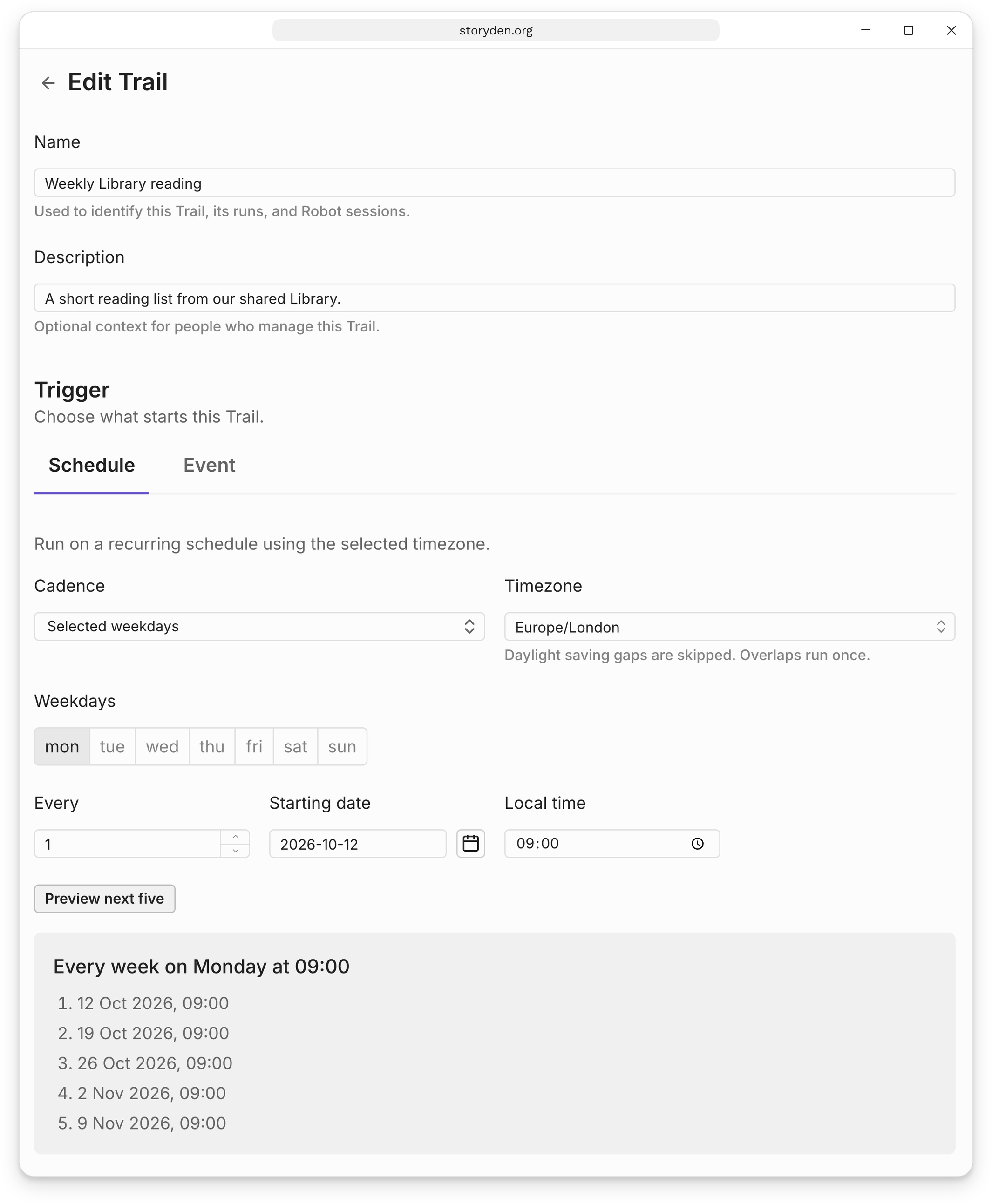
The timezone is part of the schedule. A weekly 09:00 schedule stays at 09:00 in that timezone when daylight saving time changes. The preview is useful for checking dates around those changes.
Choose the Robot and instruction
Under Robot actions, select the Robot and write its Unattended instruction. This is the task for each run; the Robot's own playbook still applies.
For the Community librarian from the Robots guide, we use:
Browse the Library and read up to three useful pages about design or making
things. Return a short plain-text reading list with each page title and one
sentence about it. Do not publish a thread or change any content. If no suitable
pages are available, explain that in the result.
An unattended instruction needs enough context to run on its own. Include the scope, the expected result, and what to do when there is nothing to act on. Each action starts a fresh session, so “do the same as yesterday” does not refer to the previous run's conversation.
Choose Add Robot action if the same trigger should start another task. Actions run independently; their order in the editor is not a sequence of steps, and one action does not receive another action's output.
Choose Create Trail when it is ready. New Trails are active. You can pause one from its detail page while you test or revise it.
Test the Trail
After creating it, choose Pause, then Run now. A manual run works while paused and does not move the schedule. Read the result in Run history and choose View Robot session to inspect its sources and tool calls.
When the result is useful, choose Resume to enable automatic runs. If you are just exploring, leave it paused. Continue with Schedules, Event triggers or Runs and results.